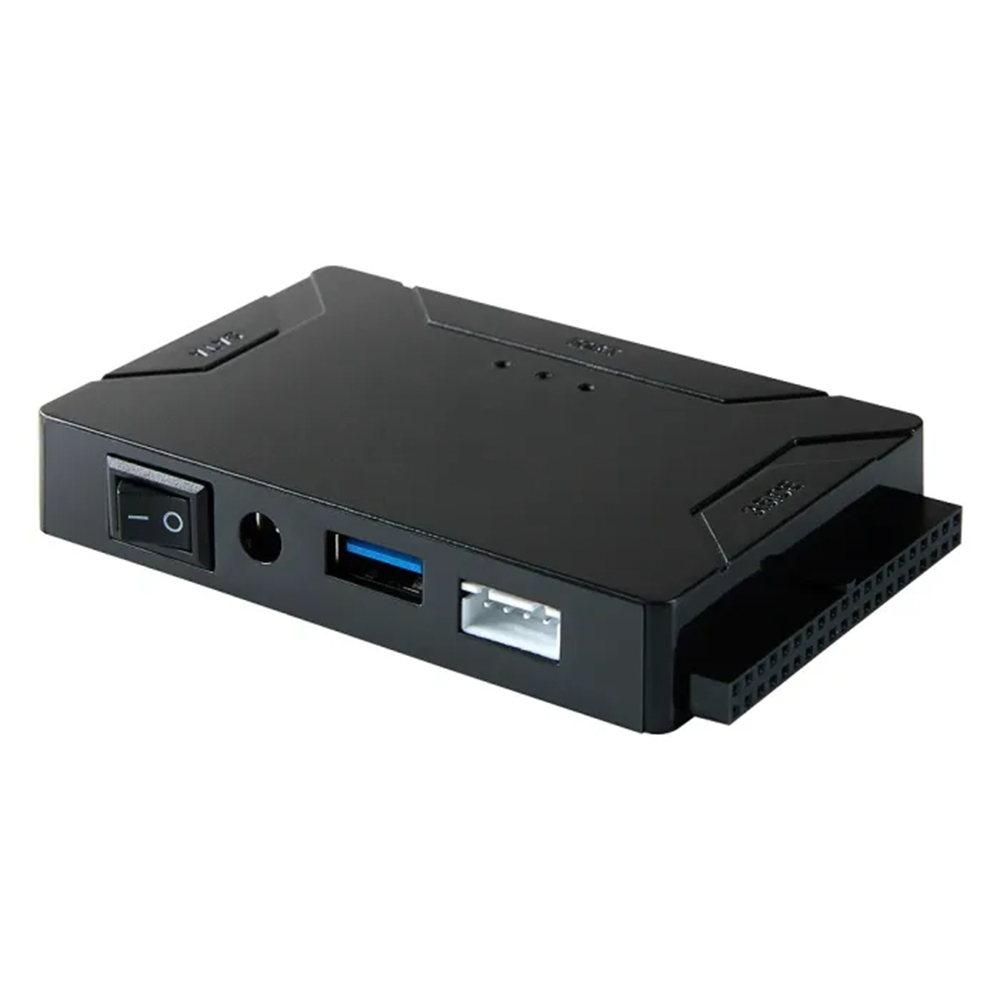
powerstep® Ultra Recovery Converter
powerstep® Ultra Recovery Converter
BUNDLE & SAVE
Couldn't load pickup availability

powerstep® Ultra Recovery Converter


⭐️⭐⭐⭐⭐
“I saw this product on social media and decided to give it a try, I have hard drives with loads of photos on them that won't even register on my computer. The hard drive converter got my files back instantly! I'm lost for words.”
RETRIEVE ALL YOUR DATA IN JUST SECONDS!
- Supports: 2.5 "/3.5" SATA HDD and SSD; 2.5"/3.5" IDE HDD, DVD-ROM, CD-ROM, CD-RW, DVD-RW, DVD + RW Optical, Blu-ray Drive through USB.
- USB 3.0 Interface: Data transfer rates can go up to 5 Gbps supporting 6TB of capacity. Backward compatible with USB 2.0
- Plug and Play: Does not require any drivers. Supports hot-swap, ON/OFF switch for HDD protection.
- Compatibility: Our converter is compatible with Windows 11/10/ 8.1/ 8/ 7/Vista/XP, Mac IOS, and Linux

SAY HELLO TO ALL THOSE FILES YOU THOUGHT WERE LOST
The powerstep® Ultra Recovery Converter is the perfect tool to duplicate, copy, backup, or transfer large amounts of data from a 2.5"/3.5" IDE/SATA drive to another hard disk with a super-fast transfer speed through USB 3.0.
Data can be retrieved with the powerstep® Ultra Recovery Converter, especially from old hard drives that are now very inaccessible due to a faulty laptop or computer.
 3 DRIVES AT ONCE
The powerstep® Ultra Recovery Converter enables access to all three HDD drives simultaneously or file transfer among the 3 drives supporting 6TB of capacity.
It supports 2.5 "/3.5" SATA HDD and SSD; 2.5"/3.5" IDE HDD, DVD-ROM, CD-ROM, CD-RW, DVD-RW, DVD + RW Optical, and Blu-ray Drive.
Please note that the drive must be formatted if it is new otherwise windows won't see anything in file explorer. DIVERSE COMPATIBILITY
The powerstep® Ultra Recovery Converter is drive free and compatible with Windows 11/10/8.1/8/7/2000/XP/Vista, Linux, Mac OS and many more. It supports Hot-Swapping with ON/OFF switch for HDD protection.
It is also backward compatible with 2.0 ports as well, so you'll be able to connect it to a regular USB port of your computer.
DEAD COMPUTER? NO PROBLEM!
Just because your computer is from 2000 doesn't mean your files are gone forever. Hard drives have zero need to be plugged into a power source, allowing you to extract those files from decades ago.
HOW TO USE:
Step: 1
After plugging in your 12V 2A power cord to the wall outlet, plug in your old IDE hard drive to the designated 2.5" or 3.5" IDE port.
Step: 2
Insert your new hard drive to the SATA port. It doesn't matter if it's a hard drive or a solid-state drive. As long as its connection port is 2.5" or 3.5".

Step: 3
After connecting your USB 3.0 to the converter box to your computer, flip the ON/OFF switch to ON. Your computer will read the converter box like any other USB. Transfer your files.

Each box contains:
- 1 – USB 3.0 IDE/SATA Converter
- 1 – 12V 2A Power Adapter
- 1 – 1 Meter/3ft male to male USB 3.0 Data Cable
- 1 - Large 4-Pin to Small 4-Pin Molex Power Cable

Supported IDE Interface: 2.5” & 3.5”
Supported SATA Interface: 2.5” & 3.5”
Operating System Compatibility: Windows 11/10/9/8.1/8/XP/Vista, Mac OS 9 and newer, Chrome OS, Linux
USB Interface: USB 3.0, backward compatible with USB 2.0 / 1.1
Storage Capacity Support: 6TB
Cable Length: 1 meter / 39 inches
Hard Drive Connectivity: Supports up to 3 hard drives simultaneously
Transfer Speed: 5Gbps
Compatible Devices:
2.5”/3.5” SATA hard drives and SSDs
2.5”/3.5” IDE hard drives and SSDs
5.25” DVD-ROM, CD-ROM, Blu-ray, CD-RW, DVD-RW, etc.
Power Supply: 12V 2A